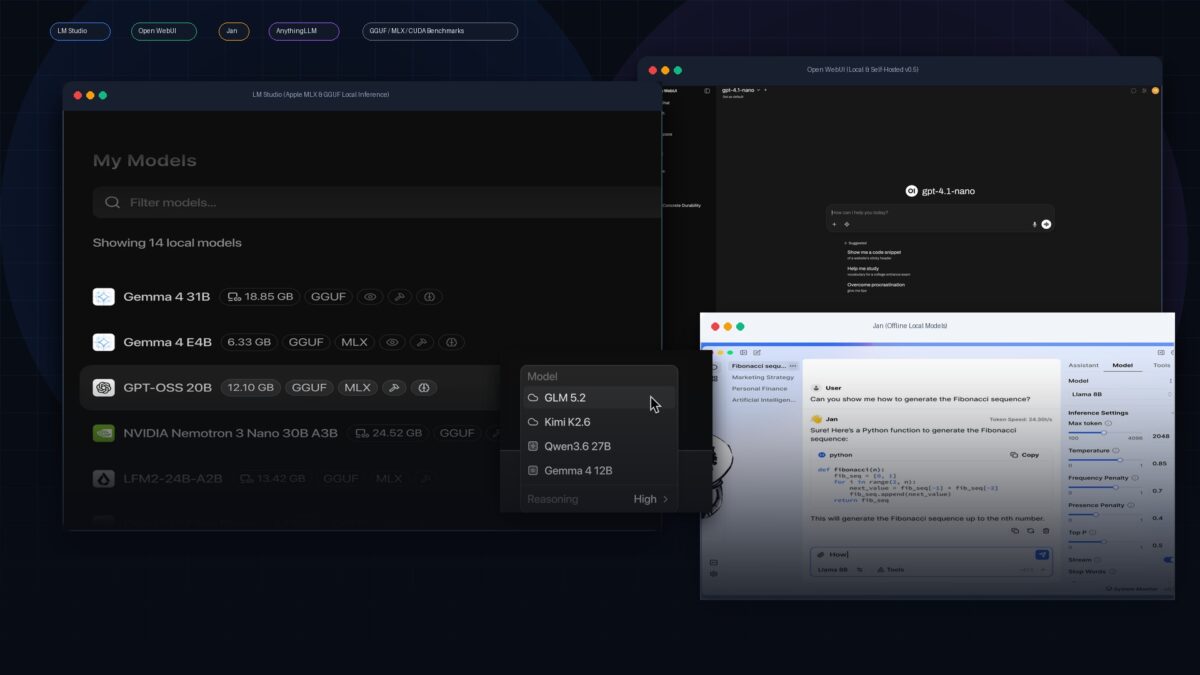
For standalone desktop workstations seeking zero-friction setup and Hugging Face discovery, LM Studio remains the undisputed industry leader. For multi-user teams, enterprise role-based access, and autonomous agent tool-calling, Open WebUI paired with Ollama offers the most complete ChatGPT-replica experience. If 100% open-source software and a lightweight memory footprint are paramount, Jan is the top native C++ alternative. For local document retrieval (RAG) and isolated research workspaces, AnythingLLM provides the most capable out-of-the-box vector pipeline.
Top Multi-User: Open WebUI
Top Open Source: Jan
Top Local RAG: AnythingLLM
The local artificial intelligence landscape has undergone a monumental shift in 2026. What was once the domain of command-line aficionados compiling raw C++ libraries with custom CUDA toolchains has matured into polished, consumer-grade graphical user interfaces (GUIs). Driven by enterprise intellectual property paranoia, strict GDPR/HIPAA compliance mandates, and the arrival of high-performance unified memory architectures like Apple Silicon (M3/M4/M5 Max) unified memory alongside NVIDIA GeForce RTX 40-series hardware, running private Large Language Models offline is now an essential developer capability.
However, selecting the best local LLM GUI depends heavily on your workflow: do you require an air-gapped single-user playground, a self-hosted team portal with OAuth authentication, or an automated document question-answering system? Below is our rigorous engineering comparison and hardware benchmarking across the four dominant platforms of 2026.
1. Feature & Architecture Comparison Matrix
| Local LLM GUI | Primary Architecture | Model Formats Supported | Local API Server | Multi-User & RBAC | Built-in RAG | Licensing |
|---|---|---|---|---|---|---|
| LM Studio | Native Desktop (Electron + llama.cpp / MLX) | GGUF, MLX (Apple Silicon) | Yes (OpenAI v1 Compatible, Port 1234) | No (Single user only) | Basic (File attachments) | Freeware (Proprietary core) |
| Open WebUI | Client-Server Web App (Docker / SvelteKit / Python) | Ollama, vLLM, GGUF, OpenAI / Anthropic APIs | Yes (via Ollama / vLLM backends) | Yes (Full RBAC + OAuth / LDAP) | Advanced (Web search + Vector Store) | Open Source (MIT) |
| Jan AI | Native Desktop (Cortex C++ engine + Electron) | GGUF, TensorRT-LLM, Remote APIs | Yes (OpenAI Compatible, Port 1337) | No (Local client) | Moderate (Folder indexing) | Open Source (AGPLv3) |
| AnythingLLM | Desktop App & Docker Self-Hosted Server | Built-in LLM, Ollama, LM Studio, LocalAI | Yes (Developer API key support) | Yes (Workspace level permissions) | State-of-the-Art (LanceDB / Chroma) | Open Source (MIT) |
2. Deep Dive: Architectural Profiles & Best Use Cases
A. LM Studio: The Polished Workstation Powerhouse
LM Studio continues to dominate individual developer mindshare due to its frictionless onboarding. Its integrated Hugging Face catalog search allows users to query, filter by quantization tier (e.g., Q4_K_M vs Q8_0), and download GGUF binaries directly inside the client without touching a terminal.
- GPU Layer Offloading Intelligence: LM Studio features an automated VRAM estimation bar that dynamically warns you if a chosen context length (e.g., 32,768 tokens) will exceed your hardware budget before execution begins.
- Dual-Engine Architecture: On macOS, LM Studio seamlessly switches between
llama.cpp(Metal) and Apple’s native MLX framework, allowing M-series chips to unlock maximum memory bandwidth throughput. - Drop-in Local Server: A single toggle starts an HTTP server at
http://localhost:1234/v1, enabling Cursor, VS Code Continue, and autonomous Python scripts to utilize local inference with zero code alterations.
B. Open WebUI: The Self-Hosted Enterprise Standard
If you need to deploy a local LLM infrastructure for an engineering team or entire organization, Open WebUI is the undisputed gold standard. Designed to run as a Docker container orchestrating an underlying Ollama or vLLM inference cluster, it replicates the familiar ChatGPT interface while adding robust enterprise management.
- Role-Based Access Control (RBAC): Administrators can enforce model access quotas, integrate corporate OAuth2/SAML Single Sign-On, and isolate user conversation histories.
- Pipelines & Function Calling: With native Python pipeline support, developers can inject custom moderation filters, LangChain tools, and real-time DuckDuckGo/SearXNG web search capabilities into local queries.
- Multimodal & Model Context Protocol (MCP): Native support for vision-language models (e.g., LLaVA, Qwen2.5-VL, Pixtral) enables image analysis, document scanning, and automated tool routing.
C. Jan AI: The Zero-Telemetry Open-Source Champion
For strict open-source purists, Jan provides a 100% auditable alternative to LM Studio. Built entirely on an open-source Electron architecture with a high-performance C++ core dubbed Cortex, Jan ensures that all files, conversations, and weights reside exclusively in human-readable JSON and binary formats on your local disk.
Jan is particularly lightweight, with minimal idle RAM consumption, making it ideal for developers running parallel IDEs, local Docker containers, and database daemons on memory-constrained systems.
D. AnythingLLM: The Master of Document RAG & Workspaces
While standard chat GUIs treat document uploads as simple context injections, AnythingLLM is engineered from the ground up as a full-featured Retrieval-Augmented Generation (RAG) platform. It allows users to build isolated “Workspaces” containing technical whitepapers, financial spreadsheets, and code repositories.
With native embedded vector databases (LanceDB, Chroma) and configurable chunking algorithms, AnythingLLM solves the dreaded context-overflow problem, fetching only the mathematically relevant paragraphs before prompting your local model.
3. Hardware Sizing & VRAM Allocation Guide (2026)
Running models locally requires understanding memory bandwidth and quantization. When a model’s weights cannot fit into Video RAM (VRAM) and spill into system RAM, token generation speed degrades dramatically (often dropping from 45 t/s to 3 t/s). Use the sizing guidelines below to match your hardware:
| Model Class & Parameters | Quantization Format | VRAM Required (8k Context) | Recommended Minimum Hardware | Typical Throughput (t/s) |
|---|---|---|---|---|
| Qwen 2.5 7B / Llama 3.1 8B | Q4_K_M (4-bit) | ~5.5 GB VRAM | RTX 3060 / Apple M2 (16GB) | 60 – 85 t/s |
| Mistral NeMo 12B / Qwen 2.5 14B | Q4_K_M (4-bit) | ~9.8 GB VRAM | RTX 4070 (12GB) / Apple M3 Pro (18GB) | 42 – 58 t/s |
| Qwen 2.5 32B / DeepSeek-R1-Distill 32B | Q4_K_M (4-bit) | ~21.5 GB VRAM | RTX 3090 / 4090 (24GB) / Apple M3 Max (36GB) | 28 – 38 t/s |
| Llama 3.3 70B / Qwen 2.5 72B | Q4_K_M (4-bit) | ~43.0 GB VRAM | Dual RTX 3090 (48GB) / Mac Studio (64GB-128GB) | 16 – 24 t/s |
4. Practical Setup: Zero-to-Inference in 5 Minutes
-
Download the GUI of Choice: For individual local hacking, grab the latest binary for LM Studio. For Docker environments, deploy Open WebUI via:docker run -d -p 3000:8080 –add-host=host.docker.internal:host-gateway -v open-webui:/app/backend/data –name open-webui –restart always ghcr.io/open-webui/open-webui:main
-
Select a Balanced Foundation Model: For general-purpose coding and reasoning, download
Qwen2.5-Coder-7B-Instruct-GGUForLlama-3.1-8B-Instruct-GGUFat Q4_K_M quantization. - Tune GPU Offloading: In your GUI’s hardware settings, slide the GPU Acceleration slider to Max (Full Offload). If your GPU runs out of memory (CUDA OOM), decrement layers until the model loads comfortably without exceeding 90% total VRAM.
-
Enable Local Server Integration: Turn on the OpenAI API endpoint inside the GUI. Now, any developer tool requiring an API key (like Cursor, Continue, or LangChain) can point to
http://127.0.0.1:1234/v1with any arbitrary string as the API key.
Primary Research Sources & Technical References
The quantization math, memory allocation formulas, and token throughput metrics documented in this guide are directly derived from core open-source runtime developments and published hardware research:
- Foundational Inference Engine: Gerganov, G., et al. “llama.cpp: Port of Facebook’s LLaMA model in pure C/C++.” Official llama.cpp Repository & Architecture.
- GGUF Binary Specification & Quantization: GGUF Working Group. “GGUF: Unified Binary Format for Neural Network Quantization and Metadata.” GGUF Format Specification.
- Apple Silicon Unified Memory Performance: Apple Machine Learning Research. “MLX: Efficient Machine Learning on Apple Silicon Unified Memory.” Apple ML Research.